Tutor scheduling software for private tutors
Students ask for a trial lesson on your booking page, cancel in their portal and get a reminder the day before. Every lesson you mark lands on the month-end bill.
See how it works

Timeplanned is tutor scheduling software for tutors who teach the same students every week. It keeps the weekly calendar, records each lesson as taught or cancelled, with or without your fee, and turns that record into each student's bill at the end of the month. It costs $9.99 a month after a 60-day trial, with every feature included.
What to look for in tutor scheduling software
Tutor scheduling software books the slot. A tutor's week needs five things after that.
A booking page students use
New families should be able to ask for a trial lesson without an email thread, and regular students should see which lessons are open.
Attendance that feeds billing
If marking a lesson as taught does not change what the family owes, you rebuild the month from memory on the 31st.
Lesson packs
Many tutors sell ten lessons up front. The tool has to count them down as they are taught, not as they are booked.
Reminders that send themselves
A reminder the day before stops most of the "I forgot" no-shows. You should not be the one sending it.
A view for parents
Most tutoring students are children. The parent pays, so the parent needs to see the schedule, the lessons left and what has been paid.
Compared with the usual choices
Most tutors start with a shared calendar or a general booking tool. Both handle the slot well and stop there.
| What you need | A shared calendar | A general booking tool | Timeplanned |
|---|---|---|---|
| Booking page | A shared calendar: None; times are agreed by message. | A general booking tool: Yes, for single appointments. | Timeplanned: Trial-lesson requests on your own page; regular students book open lessons in the portal. |
| Attendance and billing | A shared calendar: Kept somewhere else, usually a spreadsheet. | A general booking tool: Payment is usually taken per booking, before the lesson. | Timeplanned: Each lesson marked taught or cancelled, with or without your fee; the month-end bill is drafted from it. |
| Lesson packs | A shared calendar: Counted by hand. | A general booking tool: Some sell packages, counted per booking. | Timeplanned: Counted down per lesson taught, balance visible to the parent. |
| Late cancellations | A shared calendar: A message, then a discussion. | A general booking tool: Whatever the tool's refund rules allow. | Timeplanned: The student cancels in the portal and sees whether it is in time or late with the fee. |
| Best for | A shared calendar: A few regular students who pay in cash. | A general booking tool: One-off appointments paid in advance. | Timeplanned: Weekly students billed for the lessons they actually had. |
How Timeplanned does it
Timeplanned covers each of the five in the app you open between lessons.
Your booking page
Turn on your booking page and share its address, your-name.timeplanned.com. A new family fills in the trial-lesson form, and confirming the request creates the student.
Attendance into the bill
After each lesson, mark it taught or cancelled, with or without your fee. At month end Timeplanned drafts each student's bill from those marks, with a PDF invoice you can hand to the parent.
Packs that count down
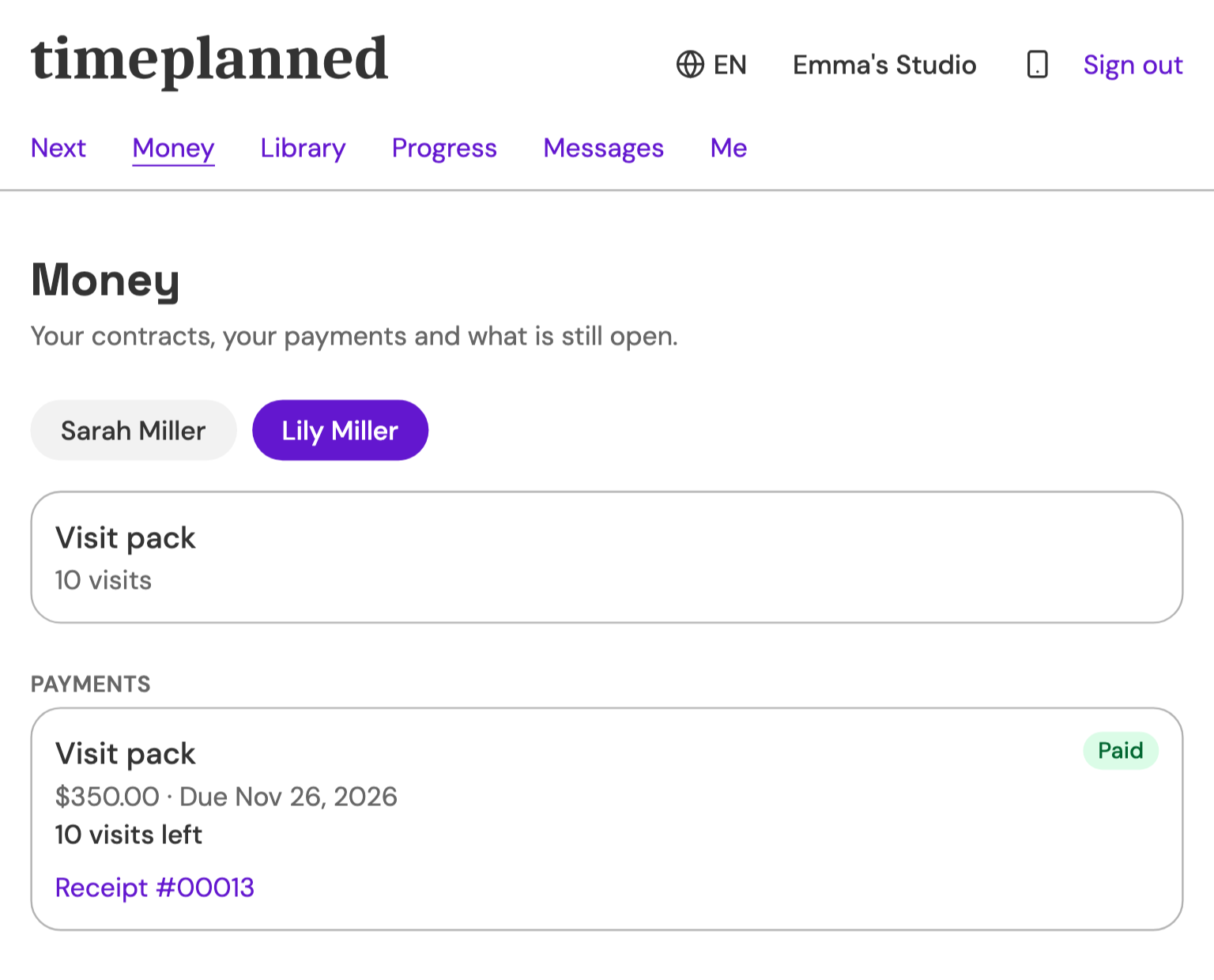
Sell a ten-lesson pack. Each lesson taught takes one off, and the parent sees how many are left.
Reminders by email
Students get an email 24 hours before each lesson, or 2, 6, 12 or 48 hours if you prefer. Each reminder goes out once, and a student can switch them off.
The parent portal
A parent signs in with an email link and switches between their children: upcoming lessons, the pack balance and what has been paid. A lesson cancelled there shows at once whether it is in time or late.
When Timeplanned is not the right fit
Timeplanned is the wrong tool in four cases, and it is better to know that before an evening of setup.
- You tutor through a marketplace that already books and bills your students. Timeplanned would duplicate it.
- You need a video classroom with a whiteboard built in. Timeplanned schedules and bills the lesson; the call runs in the video tool you use now.
- You run a learning center with dozens of tutors, payroll and a sales pipeline. Timeplanned is built for one tutor or a small team.
- Your students pay cash per lesson and nobody ever asks what is owed. A paper diary is enough.
$9.99 a month or $99 a year, every feature included
Every account starts with 60 days to try it, no credit card. The founding price on the Solo plan is $5.99 a month. See pricing
Questions tutors ask before switching
- What is the best tutor scheduling software for a private tutor?
- For a tutor with regular weekly students, the best tool is one where attendance feeds billing, not a bare calendar. Timeplanned keeps the schedule, records each lesson as taught or cancelled, with or without your fee, counts down lesson packs and drafts the month-end bill. It costs $9.99 a month with every feature included.
- Does Timeplanned work for online tutoring?
- Yes. Lessons sync to Google Calendar and Outlook, and each lesson keeps its own time zone, so a student in another country sees the right local time. The video call itself runs in the tool you already use.
- Can I charge for late cancellations and no-shows?
- Yes. You set a cancellation policy on the lesson. When a student cancels in the portal, Timeplanned shows whether the cancellation is in time or late and applies your fee. A no-show is recorded as a charged cancellation, so the history is there when you bill it.
- Does it work for a tutoring center with several tutors?
- Yes, for a small team. One subscription covers the account, and each additional active tutor costs $4.99 a month or $49 a year. Each lesson is assigned to the tutor who gives it, and students and billing are shared. A large center that needs payroll or a sales pipeline will want a bigger system.
- How much does tutor scheduling software cost?
- Timeplanned costs $9.99 a month or $99 a year, with every feature included. Every account starts with a 60-day trial and needs no credit card. Accounts in the euro area pay €9 a month or €89 a year.
Try it on next week's lessons
Add your regular students, mark a week of lessons and look at the bills it drafts. You have 60 days to decide.